Legacy Documentation
Desktop And Mini DBA Server
Legacy Documentation Home
alerts
analysisservicesalerts
analysisservicescpu
analysisservicesdashboard
analysisservicesdatabases
analysisservicesio
analysisservicessessions
azurealerts
azuredatabase
azuredatabasehealthcheck
azureindexes
azurelocks
azure security
azuresessions
azuresql
azuresqldatabase
azuresqldatabasedashboard
azuresqldatabases
azure sql server dashboard
azuretables
azurewaits
compare performance baseline
connections
cpu
custom sql server alerts
database
database query performance
databases
defaulttrace
dm exec query statistics xml
documentation
errorlog
files
gettingstarted
healthcheck database
healthcheck sql server
history active
history blocking
history data storage
history deadlocks
history files
history memory
history viewer
history waits
howtoperformancetuneazuresqldatabase
how to performance tune sql server
how to sql server performance tuning
how to sql server query tuning
indexes
Installation
io
License Support
locks
maintenance windows
options
performance history
security
server
servergettingstarted
Server Installation
server memory
serveroptions
serversecurity
servertroubleshooting
sql database memory
sql execution plan
sql extended event sessions
sql server activity
sql server alert configuration
sql server alerts
sql server database
sql server execution plan view
sql server index defrag jobs
sqlserverindexfragmentation
sql server index fragmentation
sql server index maintenance
sql server live query statistics
sqlserverqueryperformance
sql server query performance
sql server send slack alerts
sql server send teams alerts
sql server transaction log
sql server wait statistics
tables
tranlog
waits
webmonitorconfigure
webmonitorconnections
webmonitorcurrent
webmonitorcustom
webmonitorenterprise
webmonitorgettingstarted
webmonitorhistoric
webmonitorinstallation
webmonitorio
webmonitormemory
webmonitoroptions
webmonitoroverview
webmonitorsecurity
webmonitorwaits
wmi
SQL Server alerts can be sent from Mini DBA to Microsoft Teams. This can be done differently for all alert types and both minor and major priority levels depending on how active you want the channel to be.
Leveraging the Teams platform can help you ensure all team members have visibility into your database alerts. Once a SQL alert is in a Teams channel it can be commented on using Teams's messaging facilities.
From user feedback we know that some people like to setup all major priority SQL alerts get emailed out to team members while both major and minor alerts are sent to Teams. This keeps peoples inboxes from filling with every alert and allows browsing of all alerts by anyone on the channel.
Splitting Mini DBA SQL alerts into different Teams can be useful. For example having both minor and major Teams lets you only subscribe to major alerts but gives you the ability to see all minor alerts if you wish. This keeps your incoming messaging tailored to exactly how you want it.
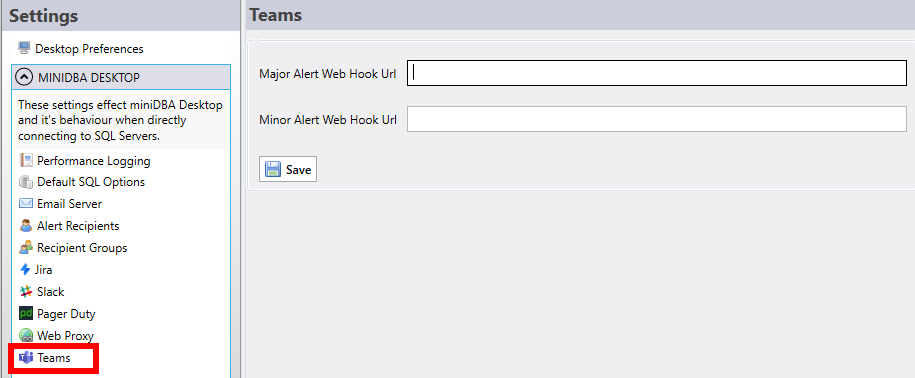
Minor and major alerts are optional and can be configured independently. If you only want to receive major alerts then only configure the major web hook url.
Leveraging the Teams platform can help you ensure all team members have visibility into your database alerts. Once a SQL alert is in a Teams channel it can be commented on using Teams's messaging facilities.
From user feedback we know that some people like to setup all major priority SQL alerts get emailed out to team members while both major and minor alerts are sent to Teams. This keeps peoples inboxes from filling with every alert and allows browsing of all alerts by anyone on the channel.
Splitting Mini DBA SQL alerts into different Teams can be useful. For example having both minor and major Teams lets you only subscribe to major alerts but gives you the ability to see all minor alerts if you wish. This keeps your incoming messaging tailored to exactly how you want it.
Configure Teams
Go to the options screen for either Mini DBA Desktop or Mini DBA Server
- Major Web hook url - the url of the Teams channel to write major alerts to
- Minor Web hook url - the url of the Teams channel to write minor alerts to
Minor and major alerts are optional and can be configured independently. If you only want to receive major alerts then only configure the major web hook url.