Legacy Documentation
Desktop And Mini DBA Server
Legacy Documentation Home
alerts
analysisservicesalerts
analysisservicescpu
analysisservicesdashboard
analysisservicesdatabases
analysisservicesio
analysisservicessessions
azurealerts
azuredatabase
azuredatabasehealthcheck
azureindexes
azurelocks
azure security
azuresessions
azuresql
azuresqldatabase
azuresqldatabasedashboard
azuresqldatabases
azure sql server dashboard
azuretables
azurewaits
compare performance baseline
connections
cpu
custom sql server alerts
database
database query performance
databases
defaulttrace
dm exec query statistics xml
documentation
errorlog
files
gettingstarted
healthcheck database
healthcheck sql server
history active
history blocking
history data storage
history deadlocks
history files
history memory
history viewer
history waits
howtoperformancetuneazuresqldatabase
how to performance tune sql server
how to sql server performance tuning
how to sql server query tuning
indexes
Installation
io
License Support
locks
maintenance windows
options
performance history
security
server
servergettingstarted
Server Installation
server memory
serveroptions
serversecurity
servertroubleshooting
sql database memory
sql execution plan
sql extended event sessions
sql server activity
sql server alert configuration
sql server alerts
sql server database
sql server execution plan view
sql server index defrag jobs
sqlserverindexfragmentation
sql server index fragmentation
sql server index maintenance
sql server live query statistics
sqlserverqueryperformance
sql server query performance
sql server send slack alerts
sql server send teams alerts
sql server transaction log
sql server wait statistics
tables
tranlog
waits
webmonitorconfigure
webmonitorconnections
webmonitorcurrent
webmonitorcustom
webmonitorenterprise
webmonitorgettingstarted
webmonitorhistoric
webmonitorinstallation
webmonitorio
webmonitormemory
webmonitoroptions
webmonitoroverview
webmonitorsecurity
webmonitorwaits
wmi
The database health check screen runs performance and configuration diagnostic tests against a database and gives warnings & recommendations based on what it finds.
Results are either "Warning" - action should be taken to remedy the problem; "Info Only" - a definite course of action cannot be given but user experimentation should be performed or "Ok" - the test passed.
Clicking on a warning in the grid will display and related details in the textbox at the bottom of the screen. These may include information like table and files effected by the health check and amounts such as disk sizes of over thresholds.
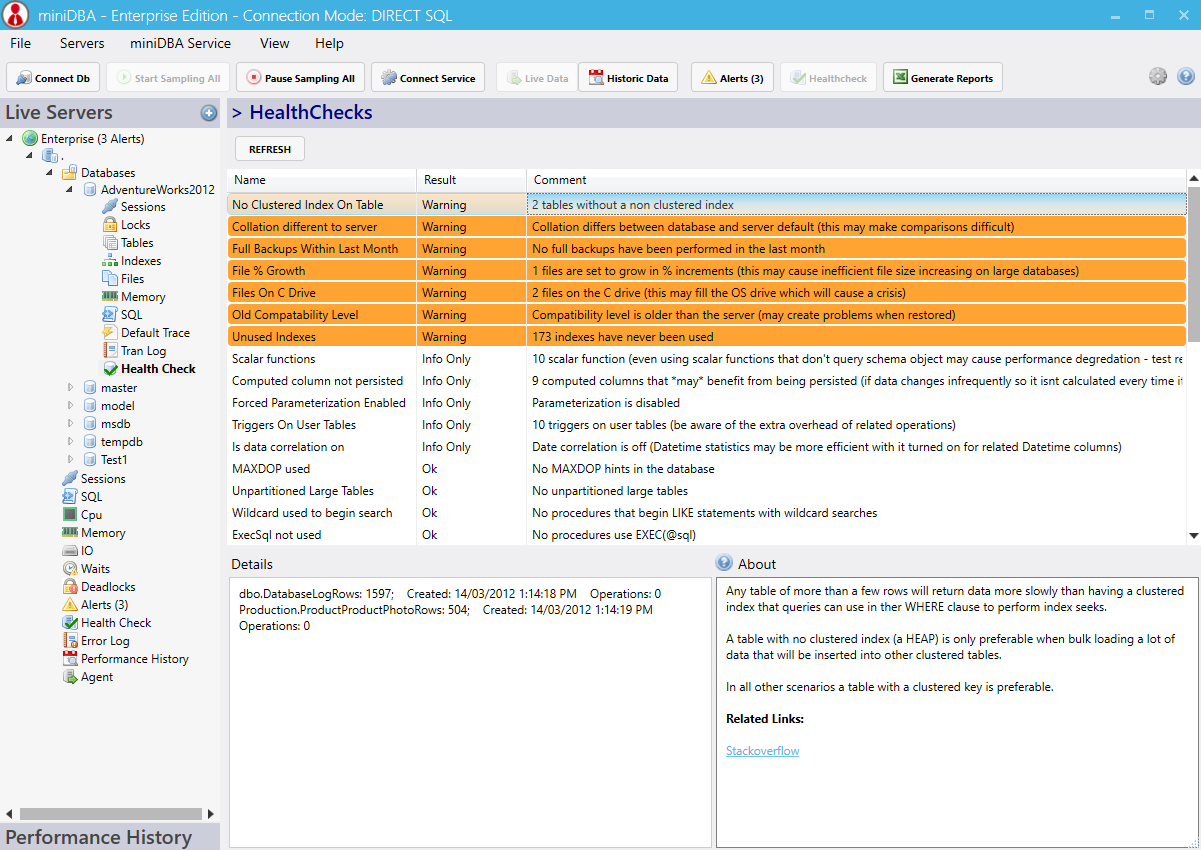
The diagnostics include T-SQL checks to identify code that may need altering to avoid common performance pitfalls as well as database configuration issues.
These health checks are at the database level - Mini DBA also has server health checks
Results are either "Warning" - action should be taken to remedy the problem; "Info Only" - a definite course of action cannot be given but user experimentation should be performed or "Ok" - the test passed.
Clicking on a warning in the grid will display and related details in the textbox at the bottom of the screen. These may include information like table and files effected by the health check and amounts such as disk sizes of over thresholds.
The diagnostics include T-SQL checks to identify code that may need altering to avoid common performance pitfalls as well as database configuration issues.
SQL Server Database Health Check List
- MAXDOP used
- Unpartitioned Large Tables
- Scalar functions
- Wildcard used to begin search
- Computed column not persisted
- ExecSql not used
- Slow reads
- Slow writes
- Forced Parameterization Enabled
- Disabled Indexes
- Triggers On User Tables
- No Clustered Index On Table
- Collation different to server
- Auto Create Stats
- Involved In Replication
- Untrusted Check Constraints
- Untrusted FK constraints
- Is Auto Close Disabled
- Full Backups Within Last Month
- File % Growth
- Files On C Drive
- Uneven file growth
- Log Larger Than Data File
- Multiple Log Files On A Drive
- Auto Update Stats Enabled
- Auto Shrink Disabled
- Optimal page verification
- Is data correlation on
- Non Aligned Indexes
- Snap shot source
- Old Compatability Level
- Procedures 'with recompile'
- Missing Indexes
- Unused Indexes
These health checks are at the database level - Mini DBA also has server health checks