Legacy Documentation
Desktop And Mini DBA Server
Legacy Documentation Home
alerts
analysisservicesalerts
analysisservicescpu
analysisservicesdashboard
analysisservicesdatabases
analysisservicesio
analysisservicessessions
azurealerts
azuredatabase
azuredatabasehealthcheck
azureindexes
azurelocks
azure security
azuresessions
azuresql
azuresqldatabase
azuresqldatabasedashboard
azuresqldatabases
azure sql server dashboard
azuretables
azurewaits
compare performance baseline
connections
cpu
custom sql server alerts
database
database query performance
databases
defaulttrace
dm exec query statistics xml
documentation
errorlog
files
gettingstarted
healthcheck database
healthcheck sql server
history active
history blocking
history data storage
history deadlocks
history files
history memory
history viewer
history waits
howtoperformancetuneazuresqldatabase
how to performance tune sql server
how to sql server performance tuning
how to sql server query tuning
indexes
Installation
io
License Support
locks
maintenance windows
options
performance history
security
server
servergettingstarted
Server Installation
server memory
serveroptions
serversecurity
servertroubleshooting
sql database memory
sql execution plan
sql extended event sessions
sql server activity
sql server alert configuration
sql server alerts
sql server database
sql server execution plan view
sql server index defrag jobs
sqlserverindexfragmentation
sql server index fragmentation
sql server index maintenance
sql server live query statistics
sqlserverqueryperformance
sql server query performance
sql server send slack alerts
sql server send teams alerts
sql server transaction log
sql server wait statistics
tables
tranlog
waits
webmonitorconfigure
webmonitorconnections
webmonitorcurrent
webmonitorcustom
webmonitorenterprise
webmonitorgettingstarted
webmonitorhistoric
webmonitorinstallation
webmonitorio
webmonitormemory
webmonitoroptions
webmonitoroverview
webmonitorsecurity
webmonitorwaits
wmi
The Manual Defrag section of the index maintenance dashboard allows you to see index fragmentation levels across your SQL Server estate and defragment where necessary with a single click.
The section is divided into 2 tabs, Analysis and Defragment
The Analysis tab helps you see exactly how fragmented indexes are. Once this is known then the Defragment tab helps you perform the actual defragmentation.
Below is a screenshot of the Analysis tab:
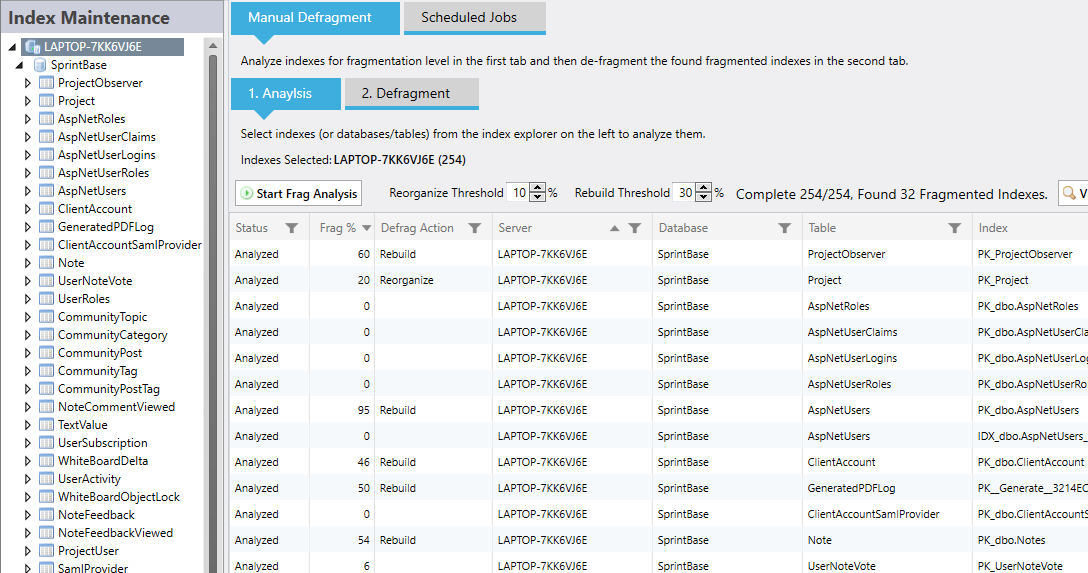
The main grid is populated by selecting SQL Server objects in the left hand "Index Maintenance" pane. In the screenshot the whole SQL Server has been selected so all indexes in all databases are shown in the grid. Selecting databases, tables or individual indexes in the left tab will update what is shown in the main grid.
Initially each index has a status of "Not-Analyzed" and it's fragmentation % will be unknown or "?". Clicking the "Start Frag Analysis" button will detect the fragmentation % and determine the action to take for each index. The action to take is determined by the rebuild and reorganize thresholds you specify above the grid. If the fragmentation % is less than the reorganize threshold then no action is taken. If it is over the reorganize threshold but below the rebuild threshold then it is reorganized. If above the rebuild threshold then it is rebuilt.
When analysis is complete and if you want to rebuild or reorgaize any indexes then click over to the Defragment tab to take action:
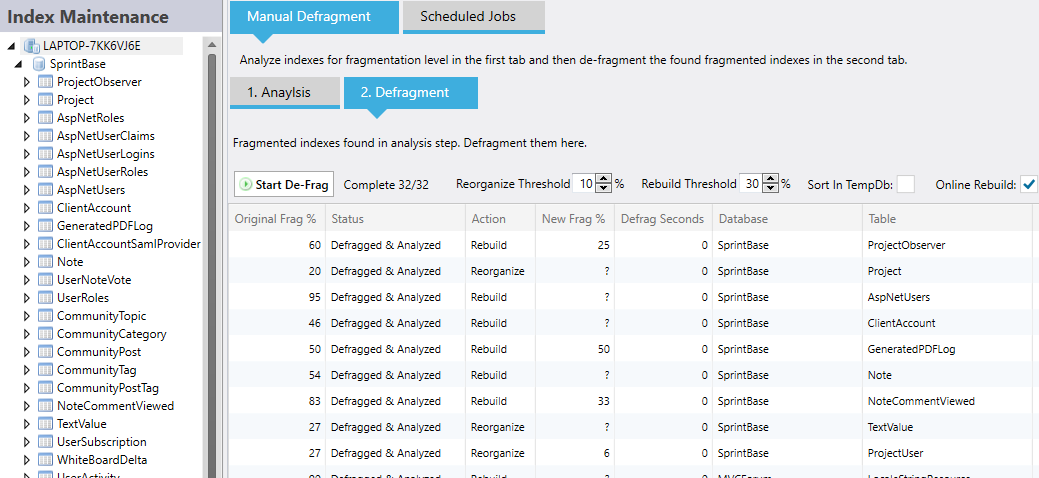
This tab is designed to help you concentrate only on indexes that need rebuilding or reorganizing and show the benefits of doing so. The results of the index analysis are shown here.
The same threshold options are found here - if you update their values you will see the Action column for each index will change as the thresholds pass the indexes fragmentation level. Also sort in tempdb and online rebuild options are included for the defragmentation operations that will occurr.
Click the "Start De-Frag" button to commence Mini DBA iterating through the indexes and performing the appropriate operation on each one. The status will change from Defragged to defragged and Analysed after each operation. The final analysis operation after the defragment is performed in order to see the new hopefully lower level of fragmentation. The new fragmentation level is shown in the "New Frag %" column and can be compared to the "Original Frag %" column.
The "Defrag Seconds" column is populated after fragmentation has occurred and is designed to help you have an idea of how long an index rebuild takes for that individual index. That time may influence how often you run defragmentation jobs on it in the future as defragmentation can negativly effect SQL Server performance.
To setup index defragmentation jobs in the Scheduled Jobs tab please see Index Defragmentation Jobs
The section is divided into 2 tabs, Analysis and Defragment
The Analysis tab helps you see exactly how fragmented indexes are. Once this is known then the Defragment tab helps you perform the actual defragmentation.
Below is a screenshot of the Analysis tab:
The main grid is populated by selecting SQL Server objects in the left hand "Index Maintenance" pane. In the screenshot the whole SQL Server has been selected so all indexes in all databases are shown in the grid. Selecting databases, tables or individual indexes in the left tab will update what is shown in the main grid.
Initially each index has a status of "Not-Analyzed" and it's fragmentation % will be unknown or "?". Clicking the "Start Frag Analysis" button will detect the fragmentation % and determine the action to take for each index. The action to take is determined by the rebuild and reorganize thresholds you specify above the grid. If the fragmentation % is less than the reorganize threshold then no action is taken. If it is over the reorganize threshold but below the rebuild threshold then it is reorganized. If above the rebuild threshold then it is rebuilt.
When analysis is complete and if you want to rebuild or reorgaize any indexes then click over to the Defragment tab to take action:
This tab is designed to help you concentrate only on indexes that need rebuilding or reorganizing and show the benefits of doing so. The results of the index analysis are shown here.
The same threshold options are found here - if you update their values you will see the Action column for each index will change as the thresholds pass the indexes fragmentation level. Also sort in tempdb and online rebuild options are included for the defragmentation operations that will occurr.
Click the "Start De-Frag" button to commence Mini DBA iterating through the indexes and performing the appropriate operation on each one. The status will change from Defragged to defragged and Analysed after each operation. The final analysis operation after the defragment is performed in order to see the new hopefully lower level of fragmentation. The new fragmentation level is shown in the "New Frag %" column and can be compared to the "Original Frag %" column.
The "Defrag Seconds" column is populated after fragmentation has occurred and is designed to help you have an idea of how long an index rebuild takes for that individual index. That time may influence how often you run defragmentation jobs on it in the future as defragmentation can negativly effect SQL Server performance.
To setup index defragmentation jobs in the Scheduled Jobs tab please see Index Defragmentation Jobs