Legacy Documentation
Desktop And Mini DBA Server
Legacy Documentation Home
alerts
analysisservicesalerts
analysisservicescpu
analysisservicesdashboard
analysisservicesdatabases
analysisservicesio
analysisservicessessions
azurealerts
azuredatabase
azuredatabasehealthcheck
azureindexes
azurelocks
azure security
azuresessions
azuresql
azuresqldatabase
azuresqldatabasedashboard
azuresqldatabases
azure sql server dashboard
azuretables
azurewaits
compare performance baseline
connections
cpu
custom sql server alerts
database
database query performance
databases
defaulttrace
dm exec query statistics xml
documentation
errorlog
files
gettingstarted
healthcheck database
healthcheck sql server
history active
history blocking
history data storage
history deadlocks
history files
history memory
history viewer
history waits
howtoperformancetuneazuresqldatabase
how to performance tune sql server
how to sql server performance tuning
how to sql server query tuning
indexes
Installation
io
License Support
locks
maintenance windows
options
performance history
security
server
servergettingstarted
Server Installation
server memory
serveroptions
serversecurity
servertroubleshooting
sql database memory
sql execution plan
sql extended event sessions
sql server activity
sql server alert configuration
sql server alerts
sql server database
sql server execution plan view
sql server index defrag jobs
sqlserverindexfragmentation
sql server index fragmentation
sql server index maintenance
sql server live query statistics
sqlserverqueryperformance
sql server query performance
sql server send slack alerts
sql server send teams alerts
sql server transaction log
sql server wait statistics
tables
tranlog
waits
webmonitorconfigure
webmonitorconnections
webmonitorcurrent
webmonitorcustom
webmonitorenterprise
webmonitorgettingstarted
webmonitorhistoric
webmonitorinstallation
webmonitorio
webmonitormemory
webmonitoroptions
webmonitoroverview
webmonitorsecurity
webmonitorwaits
wmi
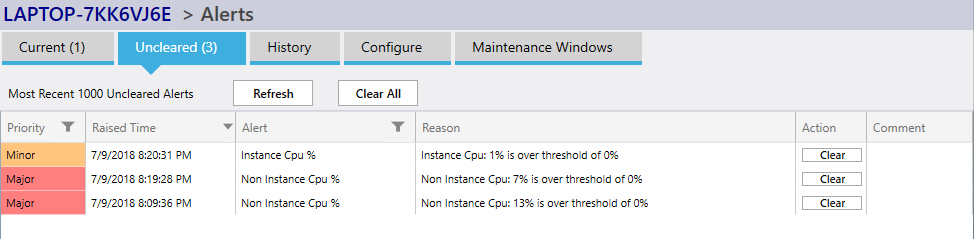
The alerts screen shows 5 tabs:
-
Current Alerts
Shows alerts that are active now. They disappear from this screen as soon as they no longer breach threshold values. This is a great view for seeing if anything is alerting at a glance. -
Uncleared Alerts
Shown in above screenshot. Shows those alerts that have been active but havent been cleared. Clearing an alert is optional and is dependant on your workflow. Clearing it only removes it from the window. -
Alerts History
Previously raised alerts are shown here, the latest 1000 are displayed. You can filter this view to show only certain priorities or alert types. -
Configuration
Alerts are configured to be raised only when certain threshold values are breached. They can send emails, write to Slack or the Windows event log as well as popping up from the Windows system tray.
Please read in more detail here - Alert Configuration -
Maintenance Windows
During maintenace windows alerts will not be raised. This is good for known server downtime or patching time when alerts will be raised but they don't matter.
A daily and weekly maintenace window can be set here for each SQL Server.
Alert Details Screenshot:
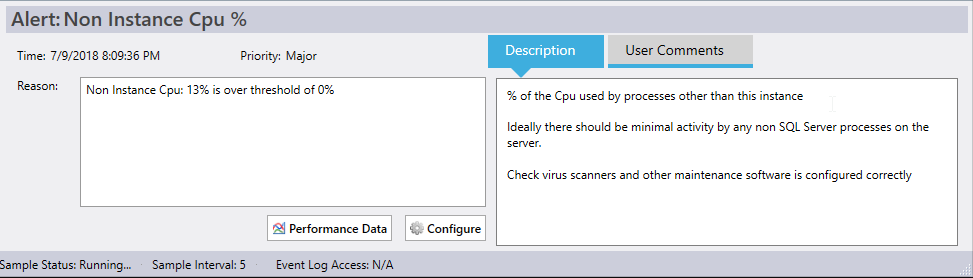
The screenshot above shows an alerts details as would be seen in any of the alert tabs. Alert details can be seen at the bottom of the screen when an alert is clicked in a grid.
Notice the Performance Data button that takes you to a point in time view of the SQL Servers performance metrics when the alert was raised. This can be helpful to find what T-SQL statements were running at the time of the alert as well as cpu, memory and disk performance.
Also the Configure button is a shortcut to the Configure tab with the alert in question shown.
The section to the right displays a description of the alert as well as a comments section that may optionally be used by team members to track work done on an alert. This is particularly powerful when used with Mini DBA Server as many people can view and edit the comments section.