Legacy Documentation
Desktop And Mini DBA Server
Legacy Documentation Home
alerts
analysisservicesalerts
analysisservicescpu
analysisservicesdashboard
analysisservicesdatabases
analysisservicesio
analysisservicessessions
azurealerts
azuredatabase
azuredatabasehealthcheck
azureindexes
azurelocks
azure security
azuresessions
azuresql
azuresqldatabase
azuresqldatabasedashboard
azuresqldatabases
azure sql server dashboard
azuretables
azurewaits
compare performance baseline
connections
cpu
custom sql server alerts
database
database query performance
databases
defaulttrace
dm exec query statistics xml
documentation
errorlog
files
gettingstarted
healthcheck database
healthcheck sql server
history active
history blocking
history data storage
history deadlocks
history files
history memory
history viewer
history waits
howtoperformancetuneazuresqldatabase
how to performance tune sql server
how to sql server performance tuning
how to sql server query tuning
indexes
Installation
io
License Support
locks
maintenance windows
options
performance history
security
server
servergettingstarted
Server Installation
server memory
serveroptions
serversecurity
servertroubleshooting
sql database memory
sql execution plan
sql extended event sessions
sql server activity
sql server alert configuration
sql server alerts
sql server database
sql server execution plan view
sql server index defrag jobs
sqlserverindexfragmentation
sql server index fragmentation
sql server index maintenance
sql server live query statistics
sqlserverqueryperformance
sql server query performance
sql server send slack alerts
sql server send teams alerts
sql server transaction log
sql server wait statistics
tables
tranlog
waits
webmonitorconfigure
webmonitorconnections
webmonitorcurrent
webmonitorcustom
webmonitorenterprise
webmonitorgettingstarted
webmonitorhistoric
webmonitorinstallation
webmonitorio
webmonitormemory
webmonitoroptions
webmonitoroverview
webmonitorsecurity
webmonitorwaits
wmi
The Scheduled Jobs tab of the Index Maintenance dashboard enables you create automated jobs that will defragment your indexes. These jobs are highly configurable to target individual databases or tables, indexes that pass certain conditions and stop if they go for too long or consume too much resource.
Right clicking these jobs gives you the options to run, cancel or delete them.
Below is a screenshot of the Scheduled Jobs tab:
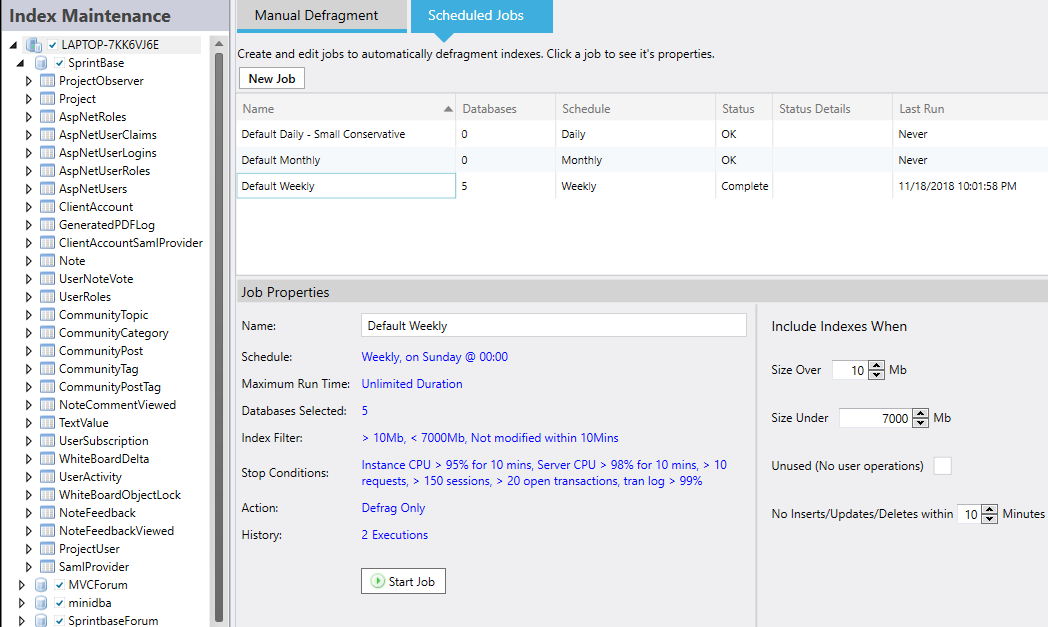
The maximum duration option lets you specify if the job should stop after a certain amount of minutes. This is useful when there is only a certain maintenance window to get all jobs complete within. Leaving this blank puts no time limit on the job.
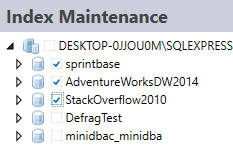
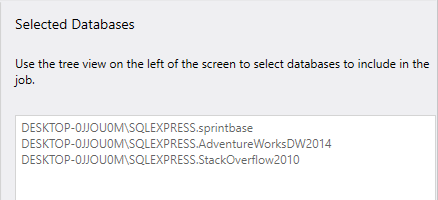
A summary is shown on the right of the screen when you click the "Databases Selected" link:
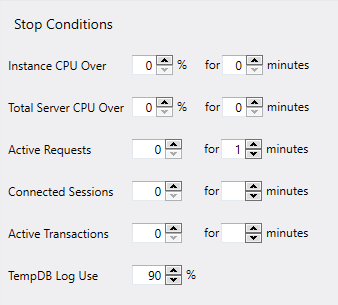
As well as selecting which resource will cause a job stop the right column has an optional number of minutes that the resource has to be above it's threshold to cause a job stop. Leaving this blank or 0 will cause it to be ignored and the job will stop as soon as the resource hits its specified threshold.
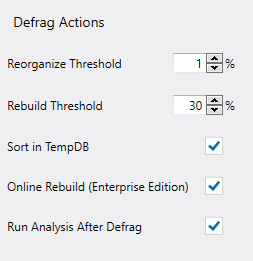
Run analysis after defrag option is used to report on the index fragmentation levels after the defragmentation has occurred. The post fragmentation level is displayed in the jobs log.
Job List
The top grid is a list of jobs (Mini DBA comes with 3 as default - you can add to this list). Clicking on a job will display it's properties in the lower half of the dashboard. This is where you will configure the jobs to behave as you require.Right clicking these jobs gives you the options to run, cancel or delete them.
Below is a screenshot of the Scheduled Jobs tab:
Job Properties
The following properties can be set for each defragment job:Name
Give your job a name that describes either when it runs and/or what server/database it runs on.Schedule
As shown in the above screenshot - on the right of the properties pane the schedule options are displayed. Select either a daily, weekly or monthly schedule. Depending on which you select you will be able to select day of the week or month and also the start time of the defrag job.The maximum duration option lets you specify if the job should stop after a certain amount of minutes. This is useful when there is only a certain maintenance window to get all jobs complete within. Leaving this blank puts no time limit on the job.
Databases Selected
Use the object explorer at the left of the screen to select the databases to include in this job.
A summary is shown on the right of the screen when you click the "Databases Selected" link:
Stop Conditions
Index defragmenting can consume large amounts of SQL Server resources such as cpu and memory. If you want your job to stop running before it completes due to the job using too many of your SQL Servers resources then use the properties here.
As well as selecting which resource will cause a job stop the right column has an optional number of minutes that the resource has to be above it's threshold to cause a job stop. Leaving this blank or 0 will cause it to be ignored and the job will stop as soon as the resource hits its specified threshold.
Action
Set thresholds for when to reorganize and when to rebuild indexes here. Sort in tempdb and online rebuild can be selected and are used where appropriate.Run analysis after defrag option is used to report on the index fragmentation levels after the defragmentation has occurred. The post fragmentation level is displayed in the jobs log.
Job History
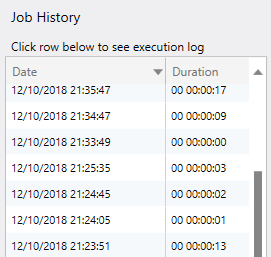
Previous executions of the job are displayed here. Clicking on a row in the grid will open the log and you can see exactly what work was performed.